This is default featured slide 1 title

Go to Blogger edit html and find these sentences.Now replace these sentences with your own descriptions.

This is default featured slide 2 title

Go to Blogger edit html and find these sentences.Now replace these sentences with your own descriptions.

This is default featured slide 3 title

Go to Blogger edit html and find these sentences.Now replace these sentences with your own descriptions.

This is default featured slide 4 title

Go to Blogger edit html and find these sentences.Now replace these sentences with your own descriptions.

This is default featured slide 5 title

Go to Blogger edit html and find these sentences.Now replace these sentences with your own descriptions.

Thursday, May 21, 2020

Latest MTN free Browsing Cheat On 24Clan VPN Green Edition Using StarTimes Plan

May 8, 2020
Another 24clan vpn green edition is here again using Startimes.we spoke and learned how to set up MTN free browsing settings on 24Clan VPN Green Edition and up till now, many users are still enjoying the tweak.
We have a new working cheat and we will be sharing it with you today. The cheat works on 24Clan VPN Green Edition using the StarTimes Bundle Plan.
Latest MTN free Browsing Cheat On 24Clan VPN Green Edition Using StarTimes Plan
For those who don’t know the good thing about powering this MTN StarTimes video streaming pack is that it gives any MTN customer more data for little money. You can subscribe to the 750MB plan for N150 or 2.2GB plan for N400 and power all apps using the 24Clan VPN Green Edition that I’m going to refer you to download in this article. So, let’s quickly take a look at the settings

Requirements

  • An Android Smartphone
  • MTN 3G or 4G SIM without active data or with a StarTimes Data Plan
  • 24clan VPN Green Edition
All MTN customers can subscribe to any of the StarTimes bundle, is to SMS the plan specific keyword to 131. All plans are accessable or valid for 24 hours.

   Plan Price    Streaming Time Activation SMS to 131 Validity
750MB N150               60mins                 ST                 24 Hours
2.25GB N400               3 Hours                ST1                 24 Hours
To check your MTN StarTimes bundle balance, simply dial *559*95# from your mobile phone.

  • Firstly Download 24clan vpn
  • also, download startimes app
  • Install the vpn and open it
  • In Tweaks, select MTN 0.0k Free server OR startimes
  • Tap on the Connect button and wait for about 10 seconds for it to connect.
  • When it’s connected, minimize the vpn and start browsing.
if you have any complain just use the comment box…..thanks
Sharing is caring!

How to Download Paid Application

Download Paid Application

GPlay has been the popular app market for Android phones and tablets for a long time, but it is not the only Android App Market around. A number of startups and some popular websites too, have launched their alternative app markets for Android. Some of these app markets even give away some popular paid apps for free.
Before you want to go on and install apps from third party marketplaces, you need to allow your device to do so. By default, Google prevents installation of apps outside Play Store on Android devices. Do the following to allow third party app installations on your device.


Go to Menu >> Settings >> Security.
Check on “Unknown Sources” (Allow installation of non-Market apps).
You will now be able to download and install apps from third party App Markets and other apk packages. Here are a few alternative places to Google Play, where you can look for a free version of a paid Android app.

Aptoide: This app store does not host Android apps themselves but rather let other users upload application. Apps can be downloaded from app repositories created by Aptoide Uploaders. Users may also add app repositories (also known as stores) created by other Aptoide users . Here you can find some paid apps for free as well as a number of other apps which have been discontinued from Google Play Store. It is quite easy to install Aptoide on Android devices.

Sunday, May 10, 2020

MTN Cheap Data plan 2020 | Get MTN 2GB for N500, 4GB for N1000 and 8GB for N2000

May 9, 2020
It is time to get back on track with MTN as we open a little trick on  how to get MTN 2GB for N500, 4GB for N1000 and 8GB for N2000 without using VPN. MTN is really taking data plan to the next level of affordability with the latest and cheapest data bonus. The fight for the cheapest data plan or grand master of data in Nigeria is getting hotter. This is MTN 4GB for N1000.
mtn data plan
The new MTN 4GB for N1000 data plan is a double data offer which is valid for 4 months. What this means, is that you get to enjoy the data offer repeatedly for 4 months. Please kindly understand that the double data offer is only available to New MTN subscribers.
How to Activate MTN 2GB Data For N500, 4GB For N1,000 and 8Gb For N2,000 On MTN 
Visit a nearby MTN shop to purchase your new MTN sim today, register and activate it.
Load your line with N500, N1000 , N2000 then dial *131*1*1# to subscribe to the plan. Since all new sim are automatically eligible to the double data offer you will be given 2GB along with your extra 2GB resulting to 4GB in total. But be aware that the validity for this package is 2 days and once the data expires you can re-activate it within a period of 4 month.
Sharing is caring!

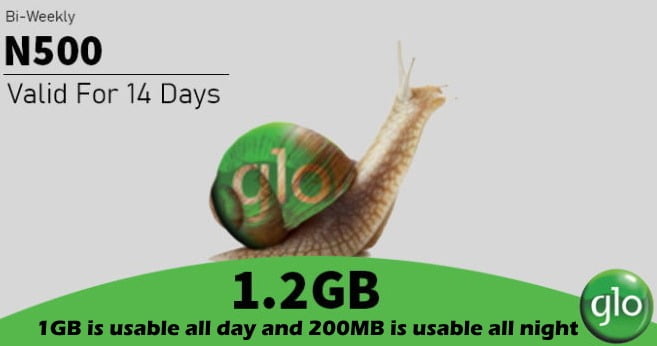
Get 1.2GB Data for Just #500 On Glo Network

You Can Now Get 1.2GB Data for Just N500 on Glo Network

As far as we know, the Glo network is not helpful in most parts of the country when it comes to the high speed of the internet, but that can’t stop the self-acclaimed Grandmaster of Data from adding the new data plan to its catalog of data plans.

Globacom has added various mouth-watering data these past few months, the likes of Glo 1GB for N100 data plan, 7GB for N1500 weekly plan, etc., and now its offering 1.2GB data for N500. For those of you in cities where Glo is working flawlessly, you can get 1.2GB for N500 usable all day and all night. 1GB is usable all day and 200MB is usable all night. How to Activate Glo 1.2GB data for N500 Dial *777#, choose 1, and 1 again to activate the plan. The validity for this plan is 14 days. Dial *127*0# to check your data balance  or go to his.glo.com

Zoom Free Meeting Call Is Now Available

Google Meet, Google’s newest video chat service, will soon be free for everybody. The service, which was previously locked behind G Suite, is opening up to everyone with a Google account.
COVID-19’s shelter-in-place requirements made millions of people turn to work from home. That led to a huge spike in video chat users. Teleconferencing service, called Google Meet, free to everybody, the decision takes aim at Zoom, the contender video chat service that’s become a household name during the stay-at-home era spurred by the novel coronavirus.
Before, Meet was only available to paying customers of G Suite, Google’s line of enterprise apps that includes Gmail, Drive, and Docs. Until now, anybody could join a meeting by clicking on a link, but creating a meeting required a G Suite membership.
The free version of the product requires a Google account, and video calls have a 60-minute cap. But Google said it won’t enforce that rule until after Sept. 30. The free version will also allow up to 100 participants and include features such as screen sharing and real-time captions.
Users will be able to access the service at meet.google.com or through the iOS and Android apps.
Google founder Pichai said Meet recently “surpassed a significant milestone” and is adding 3 million new users every day. Usage has increased 30-fold since January and Meet now has more than 100 million daily meeting participants.
Like Skype and Zoom, Meet will retain some premium features for G Suite customers, including dial-in phone numbers, larger meetings, and meeting recording.

How to use Google Meet, free

To sign up for the free version of Google Meet, go to the Google Meet page. Enter your name, email, country, and primary use for Google Meet (personal, business, education, or government). Agree to Google’s terms of service, and hit Submit. You’ll get a notification when the service is ready for you to use.
Once it’s available, here’s how to use the free version of Google Meet:
  • Go to meet.google.com (or, open the app on iOS or Android, or start a meeting from Google Calendar).
  • Click Start new meeting, or enter your meeting code.
  • Choose the Google account you want to use.
  • Click Join Meeting. You’ll have the ability to add others to your meeting, too.
Simple as that! Happy video chatting.
However, I think the general availability of Google Meet was too late to ride this wave for users. The work-from-home trend started two months ago when Google Meet was still locked behind the GSuite paywall. Zoom was ready and burst into the public consciousness as a result. By now, it seems like most of the people who were going to transition to a video chat app have already done so, and they picked Zoom.
Let’s hear your view about this general availability of Google Meet.